
Write, time, translate and dub, in one editor.
Subtitld is a subtitle editor for Linux, Windows, macOS and Haiku. Time on the waveform, transcribe and translate with engines that run on your own machine, and dub with synthetic voices.
Linux · Windows · macOS · Haiku
From a silent video to a dubbed one, without leaving the timeline.
-
01Open
A video, a subtitle file, or a transcript from a text or Word file.
-
02Transcribe
Turn the speech into timed subtitles: all of it, a range, or the selection.
-
03Time
Drag, snap and nudge each subtitle on the waveform, frame by frame.
-
04Translate
Keep each language's translation alongside the original.
-
05Dub
Speak every line with a synthetic voice, one per speaker, or record your own.
-
06Deliver
Save to SRT, VTT, TTML and more; export the dub as WAV, FLAC or MP3.
See the speech. Put the words on it.
Drag a subtitle to move it, drag its edges to retime it. It snaps to its neighbours and to a grid of frames or seconds, and the numeric keypad nudges it one step at a time.
To neighbouring subtitles, to frames, to seconds, or to scene changes.
Set a start or end to the playhead, split at the cursor, join with the next.
A whole drag, or a held nudge key, is a single step back.
Every voice gets a face, a colour and a lane.
Name the speakers and take their faces from the video. Each one gets a colour, a track of their own on the timeline if you like, and a count of how long they speak.
When you dub, every speaker keeps their own voice.
Work down the subtitles, like reading a script.
The timeline on its side, as a tab beside the video. Each subtitle is as tall as it is long, so gaps and overlaps stand out as you scroll.
Edit everything as one document.
Switch to a text view of all the subtitles, as SRT, Markdown or JSON, and type. The timeline follows.
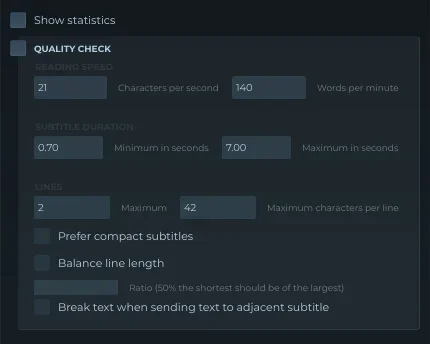
Readable, by the numbers.
Check reading speed, duration, line count and line length. The usual limits come as defaults: 21 characters per second, 140 words per minute, 0.7 to 7 seconds, two lines of 42.
Engines that run on your own machine.
Speech recognition, translation, voices and audio separation install from inside Subtitld. Each brings its own models, so the app stays small and you download only what you use.
- whisper.cpp Offline
- Vosk Offline
- RealtimeSTT As you speak
- AssemblyAI Cloud
- Offline translation Offline
OPUS-MT models, no API key.
- Piper
- Kokoro
- Supertonic
- sanoTTS
- Parler-TTS
- Qwen3-TTS
- Coqui XTTS
- F5-TTS
- Audio separator
Split the voices from the music and effects, so a dub can sit on the original background.
Someone may have subtitled this file already.
When a video opens, Subtitld can look up subtitles made for that exact file on subtitld.cc, the community hub. It sends a fingerprint, never the video or its name.
-
01
Match by fingerprint
Subtitles for the very file you opened, not one that is merely called the same.
-
02
Search, rate, open
From a panel inside the app, straight into the editor.
-
03
Publish your own
Share what you made, and remove it again if you need to.
Opens what you have. Saves what they asked for.
-
.srtSubRipOpen · Save
-
.vttWebVTTOpen · Save
-
.ass .ssaSubStation AlphaOpen · Save
-
.ttmlTimed TextOpen · Save
-
.dfxpDFXPOpen · Save
-
.smiSAMIOpen · Save
-
.sccScenaristOpen · Save
-
.usfUniversal SubtitleOpen · Save
-
.jsonWhisper JSONOpen · Save
-
.subMicroDVDOpen · Save
-
.ittiTunes Timed TextOpen
-
.usfxSubtitld projectProject
- Interface languages
- 17
- Operating systems
- 4
- Add-ons in the catalog
- 14
- Commits since 2020
- 1,560
Get Subtitld
Snap Store, Flathub, the AUR, AppImage, Microsoft Store, PyPI, and soon HaikuPorts.
Keep it free
Subtitld has no ads, no account and no paid tier. Donations, translations and bug reports keep it going.